Large recipient lists
Hundreds of messages per booking have to be sent in batches and at a measured pace, not all at once.
 ATOMENOS03 / 07
03 — CASE STUDY / YADHAVA CONVENTION CENTRE — WHATSAPP AUTOMATION & QR SYSTEM
A spreadsheet-driven automation that turns a single booking row into the right WhatsApp message for roughly 590 shareholders and directors, with duplicate protection, delivery logs and automatic archiving. Part 2 covers the QR Review & Feedback System, a supporting guest-experience tool for the same venue.
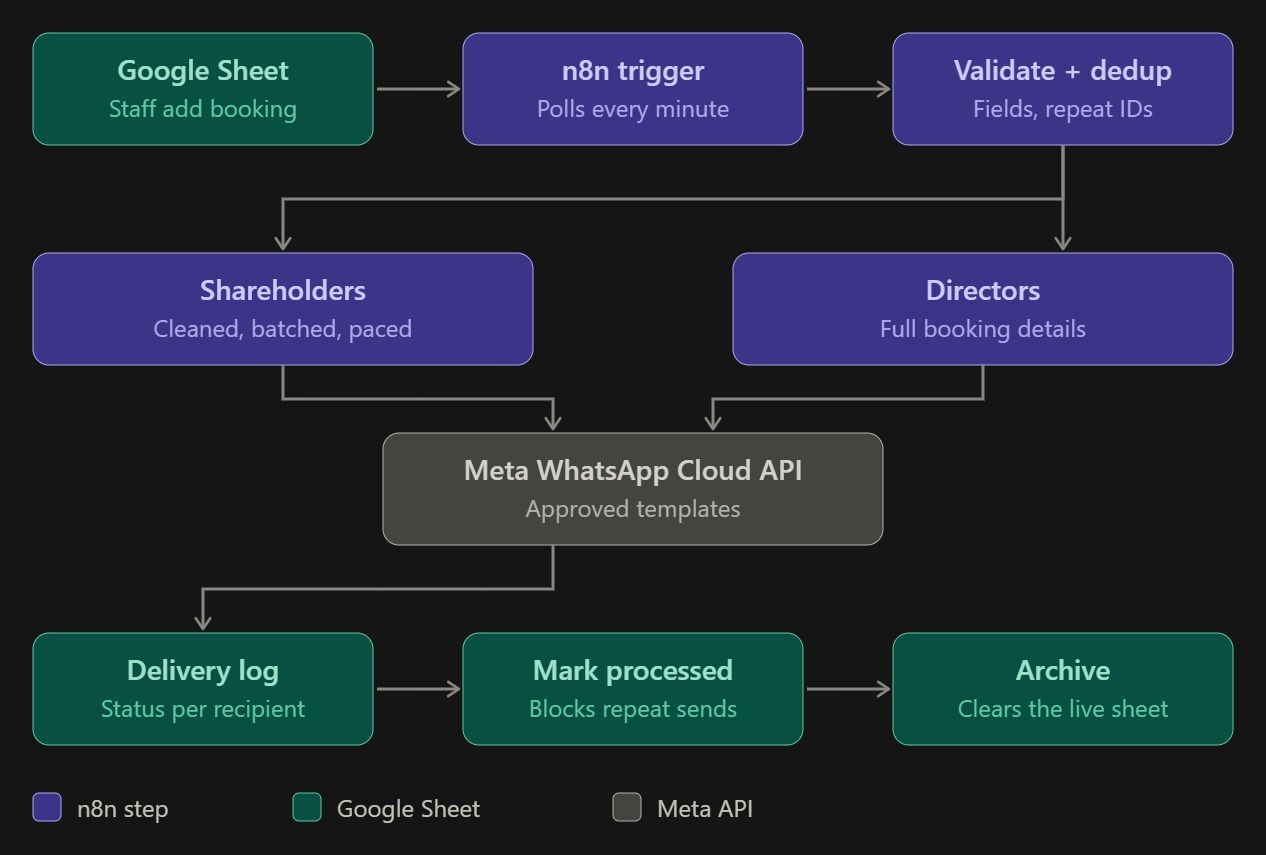
SYSTEM OVERVIEW — THE REAL ARCHITECTURE, FROM SHEET ENTRY TO ARCHIVE
Every convention-hall booking needed to reach approximately 590 recipients on WhatsApp. Shareholders needed a short update. Directors needed the full details: customer, event type, package, amount and advance.
Doing that by hand means copying a booking into hundreds of messages, keeping two different formats straight and never sending the same booking twice. The goal was to make the staff’s job one thing: enter a booking in a spreadsheet.
The operational requirements: a spreadsheet as the staff interface, two recipient groups with different message content, and WhatsApp as the channel. The contact lists were reviewed and cleaned as part of the build.
Meta’s rules decided a lot: business verification, approved Utility templates, and templates whose parameters must match exactly. The rest followed from one principle: a notification must go out once, to the right people, and leave a record.
Hundreds of messages per booking have to be sent in batches and at a measured pace, not all at once.
Shareholders get a short update; directors get full booking details. One booking, two branches.
Re-entering a booking must not trigger the same notifications again.
Some numbers were shared between records and some entries were invalid, so the lists needed cleaning before sending.
Several rows arriving close together must not get their data mixed.
Only approved templates can be used, and parameter counts must match the template exactly.
Every send outcome has to be read correctly and recorded per recipient.
A polled spreadsheet gets slower to work with as finished bookings pile up.
Staff add a booking to a Google Sheet. A self-hosted n8n workflow detects the new row, validates it, checks that the booking ID has not been processed before, and then sends WhatsApp messages through the Meta WhatsApp Cloud API: a short update to shareholders and full details to directors. Each send is logged, the booking is marked as processed, and it is moved to an archive tab.
Contact numbers are cleaned, then messages go out in batches of 20 with a pause between batches. The content is a concise booking update.
A separate branch sends the full booking details: customer, event type, package, amount and advance.
The architecture diagram above shows the flow. Google Sheets holds the data, n8n does the work, and the Meta WhatsApp Cloud API does the sending. The workflow polls the sheet every minute, so there is no webhook for staff to call.
A new booking row is picked up by the n8n Google Sheets trigger.
Required fields are checked, then the booking ID is compared with the processed list. Invalid or repeated bookings stop here.
Shareholders are cleaned, batched and paced. Directors receive the full booking details.
Both branches send through approved Utility templates.
The API outcome for each recipient is appended to a log sheet.
The booking is marked as processed, then moved to an archive tab so the live sheet stays small.
One Google Sheets row is the whole staff interface.
The n8n trigger watches the sheet and starts the workflow for new rows.
A JavaScript Code node checks the booking before anything is sent.
A booking ID already on the processed list does not send again.
Bookings are split and handled sequentially, never in parallel.
Phone numbers are cleaned into a consistent format before sending.
Short shareholder updates; full director details.
Shareholder messages go out 20 at a time with a wait between batches.
Messages use Meta-approved templates with exact parameter counts.
Each send outcome is recorded against its recipient.
Finished bookings are recorded so they cannot trigger again.
Completed bookings move to an archive tab.
Destructive steps were tested on disposable data before live use.
Add the booking row to Google Sheets. That is the only manual step. The workflow detects it, validates it and checks for duplicates.
Shareholders receive a concise update and directors receive the full details. Outcomes are logged, then the booking is marked processed and archived.
Actual delivery depends on the API response, recipient validity, template approval and WhatsApp’s own delivery conditions. An accepted API call is not the same as a delivered or read message.
Each booking ID is checked against a processed list before anything is sent. A booking that was already handled and is entered again is stopped, so no one is messaged twice.
Simultaneous bookings could previously cross wires. The workflow now splits incoming rows and processes one booking at a time, so each booking’s data stays with its own messages and log entries.
Business verification was completed with business documents rather than a website. The build uses approved Utility templates and a permanent system-user token. Parameter counts must match the approved template exactly; a mismatch made shareholder sends fail until the parameters were corrected.
586 contact records were cleaned. 88 shareholders share 34 phone numbers, and 7 invalid entries were flagged for the client to confirm. Normalising and validating numbers means fewer sends fail for avoidable reasons. These are data-cleaning results, not a claim that every record is a unique person or number.
A raw spreadsheet date serial (46292) appeared in messages until dates were formatted properly. Successful API responses with HTTP 200 were logged as failures because the workflow expected 201. A delete step also removed a sheet’s header row during testing.
Delivery status is recorded per recipient. A processed booking is marked to prevent repeat sends, then moved to an archive tab so the polled sheet does not grow forever. Destructive operations are tried on disposable data first.
Spreadsheet row starts the whole notification workflow.
Message formats: concise for shareholders, full details for directors.
Delivery log entry per recipient, for traceability.
Routine booking notifications no longer need to be sent by hand.
Processed-booking checks prevent duplicate notifications.
Shared numbers and invalid records were identified for confirmation.
Archiving keeps the polled booking sheet small.
WE DON’T CLAIM TIME SAVED, DELIVERY RATES OR READ RATES. THE ABOVE DESCRIBES WHAT WAS BUILT.
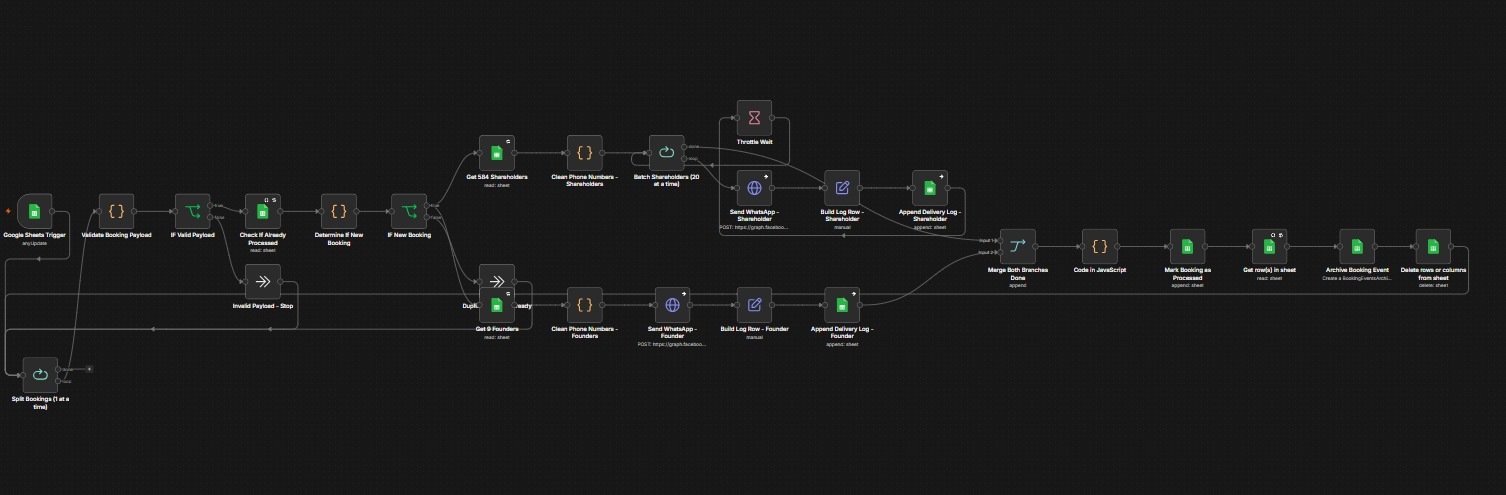
N8N WORKFLOW — THE REAL AUTOMATION. SCROLL SIDEWAYS ON SMALL SCREENS. NODE LABELS SAY “FOUNDER” WHERE THIS PAGE SAYS DIRECTOR.
A Google Sheets trigger feeds a split node that handles bookings one at a time. A Code node validates the payload, an IF node stops invalid ones, and a sheet lookup plus a decision node stops repeats.
The shareholder branch loops in batches of 20 with a throttle wait; the director branch sends once. Both build and append a delivery log row, merge, mark the booking processed, archive it and clear it from the live sheet.
These are proposals, not shipped work. Receiving Meta’s delivery-status callbacks would let the log show more than API acceptance. A retry step for failed sends, an alert to staff when a booking run has failures, and a simple summary view of the delivery log would each add visibility. Any of them would be scoped with the client first.
Check before sending so a re-entered ID cannot repeat a notification.
Sequential processing keeps spreadsheet-triggered events from crossing.
Parameter counts must equal the approved template exactly.
Normalise numbers and flag shared or invalid ones before sending.
A raw date serial should never reach a customer message.
Treat every valid success status as success, not only the one you expect.
A delete step that removed a header row was caught on test data.
Move finished rows out so the polled sheet stays small.
Alongside the WhatsApp booking automation, we built a supporting guest-experience solution for the same venue: the QR Review & Feedback System. Guests scan a location-specific QR code and choose whether their visit was good or could be improved.
Guests who enjoyed their visit are guided to leave a public review, and guests who felt it could have been better can submit feedback privately. That private feedback goes through the existing n8n webhook workflow, is logged in Google Sheets, and can trigger a Telegram notification to the team.
Like the WhatsApp automation, it runs on n8n. The review path is one part of the system; the other is private feedback.
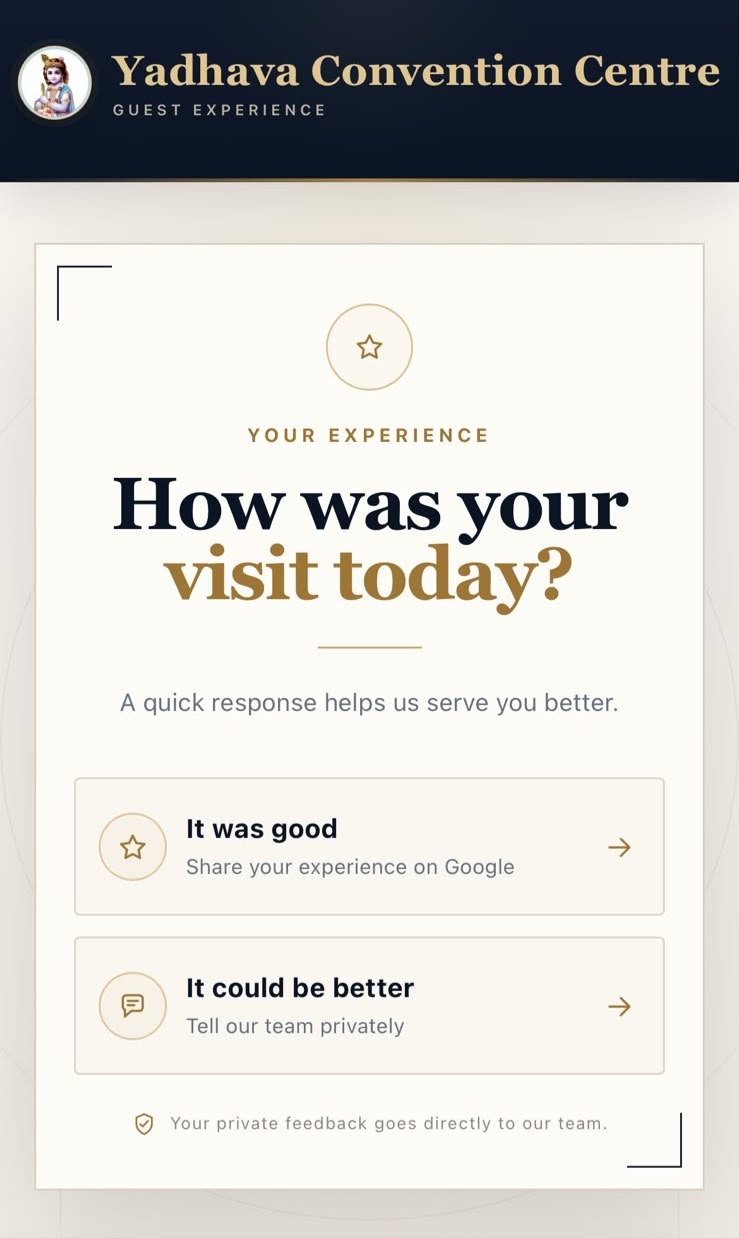
THE CUSTOMER-FACING REVIEW PAGE — A GENUINE SCREENSHOT
The venue needed a simple way to collect visit feedback. A good experience should lead to a public review, which helps the business. A disappointing one needed a private route to the team instead of a public page.
It also had to work across more than one location, and staff needed to hear about negative feedback promptly.
Good experiences can lead to a public review. Others can be sent to the team privately. The guest should barely notice the split.
Every submission has to say which location it came from, without a separate page per branch.
Negative feedback needed to reach the team quickly, and also be kept on record.
A feedback tool that only works while a laptop is open is not a real tool.
The guest is redirected straight to the Google review page for the venue, using its Google Place ID. The page handles this itself; no backend is involved.
A short form opens. On submit, the data goes to an n8n webhook, is validated and formatted, logged to Google Sheets and posted to the team on Telegram.
Each location has its own QR code, all pointing to one page that reads a ?loc= parameter to know where the scan came from. The page is plain HTML, CSS and vanilla JavaScript on Vercel and makes the rating decision. Only negative feedback leaves it, travelling to n8n running in Docker on a Hostinger VPS behind HTTPS. Google Sheets and Telegram are destinations n8n writes to; the guest never touches them.
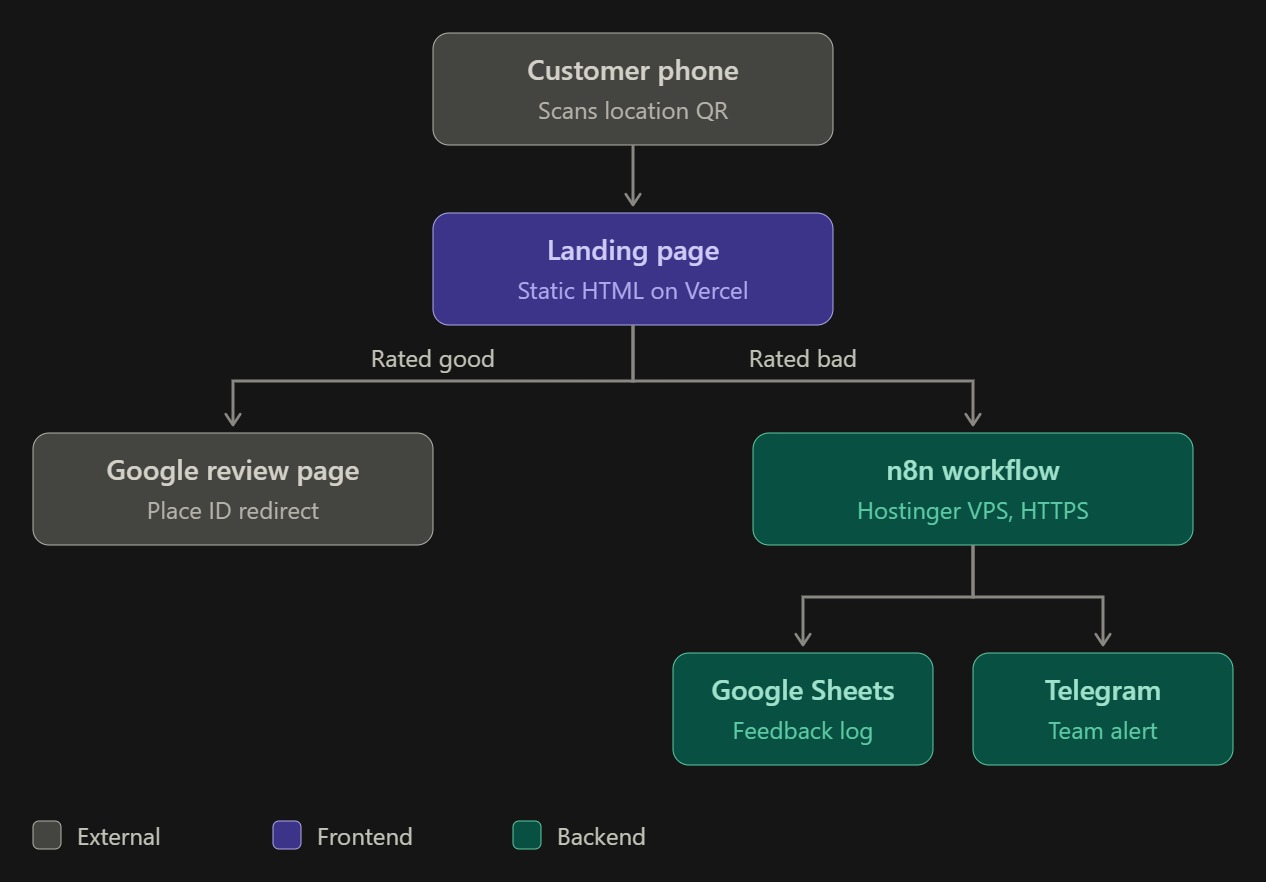
SYSTEM ARCHITECTURE — EXTERNAL (GREY), FRONTEND (PURPLE), BACKEND (GREEN)
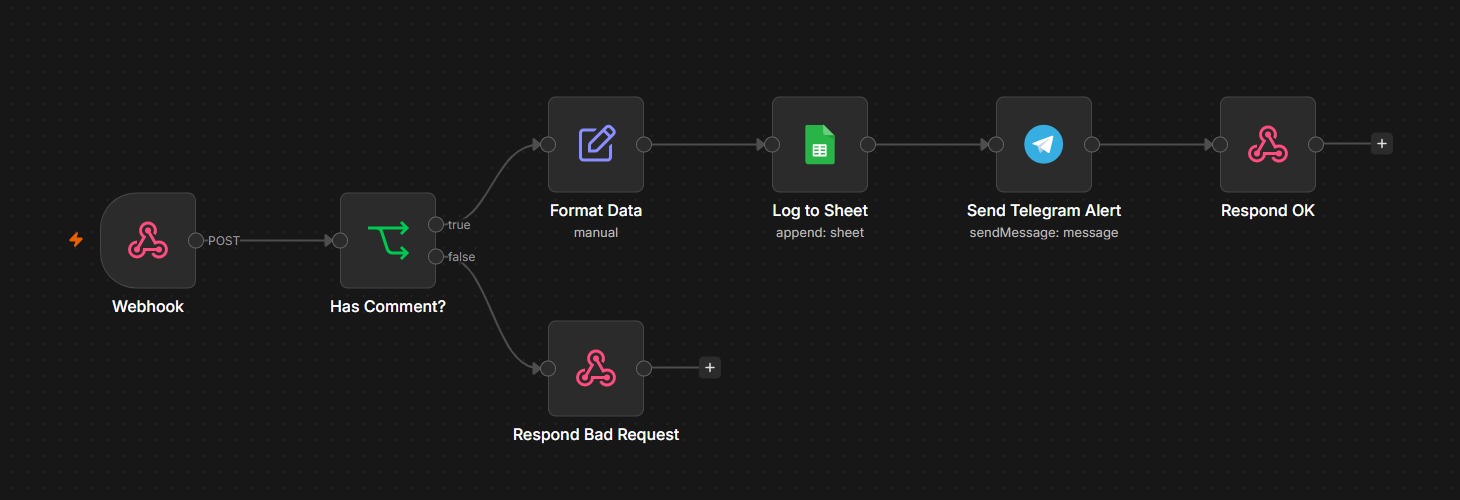
N8N WORKFLOW — THE REAL AUTOMATION RUNNING ON THE VPS
The webhook receives a POST. The “Has Comment?” check passes it, the data is formatted, appended to Google Sheets, sent to the team on Telegram, and the page gets an OK reply.
If the check fails, the workflow returns HTTP 400. Nothing is logged and no alert is sent.
One HTML page with rating, feedback-form and thank-you states.
A URL parameter identifies the location, so one page serves every branch.
Separate codes for each location, generated with Python’s qrcode library.
Satisfied guests are sent to the venue’s Google review page via its Place ID.
Browser-side validation blocks empty forms. n8n rejects invalid requests with HTTP 400.
Valid feedback is formatted and appended to Google Sheets as a persistent record.
A bot posts the comment, name, phone and location, where available, to the team group.
The thank-you state still shows if the webhook request fails.
16px form text stops iOS Safari from zooming in when a field is focused.
A single page with a ?loc= parameter replaced the idea of one page per branch. A fix is made once.
The browser stops obvious mistakes early. The webhook checks again, because a request can reach it without touching the page.
If the webhook is down, the guest still sees the thank-you state.
Safari zooms into inputs under 16px. Setting form text to 16px removed the jarring jump.
ngrok and Cloudflare tunnels were used for development and testing. Production moved n8n to an always-on Hostinger VPS in Docker, on an HTTPS custom subdomain.
A spreadsheet is a durable record; a chat message is immediate. Feedback goes to both.
These are proposals, not shipped work. A status column in the feedback sheet would let the team mark complaints as followed up. Today, only private feedback passes through n8n, so recording ratings from the positive path would be a separate addition if the venue wants that visibility.
WE DON’T CLAIM REVIEW-COUNT, RATING OR RESPONSE-RATE FIGURES. THE ABOVE DESCRIBES WHAT WAS BUILT.